Combining and minifying assets on a PHP site with PHP minify

This post was written 3 months ago.
Wed, 06 Feb 2013
loading seperate css and js assets
I've been getting carried away with my Camper Van blog over the last couple of weeks, overcompensating for my lack of actual design skills by adding loads of fancy effects such as Supersized full-screen background images, and Photoswipe for responsive photogallery/lightbox.

Looking at the network tab in chrome developer tools I was reminded how many http requests are needed to serve all the seperate css and javascript files, and that I needed to optimise it a bit. There's loads of different ways to combine and minify CSS and JavaScript assets - for example using something like Live reload on the desktop during development, or using a server-side on-the-fly system, e.g. Django Compressor on a Django site. In either case this is usually in conjunction with a CSS pre-processor such as SASS

As "on the road" is a PHP site, and I haven't got round to setting up SASS stuff for it, I decided to use PHP minify, which lets you specify groups of assets to be combined and minified, then serves them up on the fly, using caching (filesystem or memcache) to keep it snappy. The set-up is fairly straightforward, the only thing that might trip up a novice is setting up the caching.

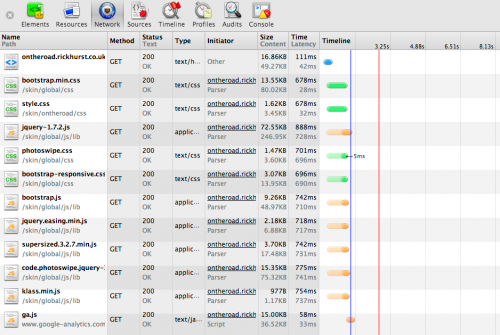
optimised assets loading
As a result (after a bit of refactoring to get things working after moving the js from the head to just before the closing body tag), I now have the site loading in a single js and a single css file, considerably improving the load time, and neatening up the source code. Note that these two screen grabs were taken on different internet connections so the actual load time of the assets shown isn't a good comparison.
Tags: php / css / javascript / site build /
Comments

Watershed 2011 rebuild

This post was written 2 years ago.
Thu, 01 Sep 2011
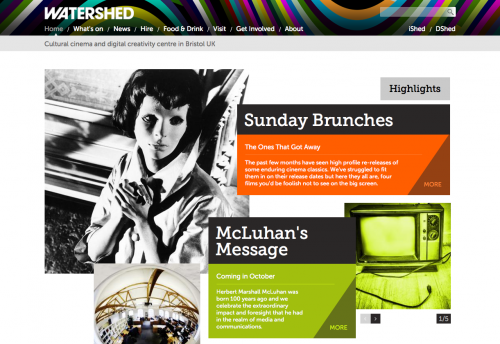
screen grab of watershed.co.uk

Last night the new version of the watershed website was pushed live. I had the pleasure of being one of many people involved in this project, which involved combining several different sites representing different projects within the watershed brand. I did the "first cut" of the HTML/CSS, working from a PSD provided by the design agency Document, and also helped with some of the Drupal theme integration, working alongside some talented watershed staff and other freelancers (i'd name them all here, but would inevitably miss someone).
Tags: watershed / drupal / portfolio / html / css /
Comments

Aardman Timmy Time

This post was written 3 years ago.
Wed, 23 Dec 2009
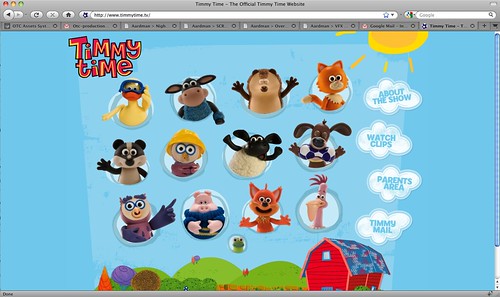
aardman timmy time
Yesterday the www.timmytime.tv was was finally launched. I worked on this project along with the Aardman digital team building a bespoke php CMS and putting the site together to accommodate the mostly flash content with HTML alternative (where possible). XML was used to share the same data between flash and PHP, making it easier to maintain.

archived comments
Congratulations for this work Rick. It's a really nice one!

nicolas 2009-12-24 09:32:26
Tags: css / php / portfolio /
Comments

Aardman.com goes live

This post was written 4 years ago.
Tue, 05 May 2009
I was really chuffed to be asked to help the aardman online team out with the build of the new aardman.com site. I took the supplied photoshop designs and created HTML/CSS templates that were then handed over to be integrated into the CMS. I'm currently doing a lot of freelance work for digital agencies and I haven't been able to talk about the websites i've been working on, so it's great to be able to shout about this one!

aardman.com website screengrab
Comments

IE6 gotcha - transparent pngs as links - only the non-transparent bits clickable

This post was written 5 years ago.
Thu, 14 Aug 2008
IE6 doesn't display transparent png images properley - by default the parts that are supposed to be transparent display as grey instead. Fortunately an excellent workaround exists in the form of PNGFix by Twin Helix. However this doesn't completely solve the problem: if you are using transparent PNG's as links - only the non-transparent parts of the image are clickable, which can be a significant usability issue. So far I haven't found an elegant workaround for this, but would be interested to hear of any.

archived comments
Had exactly the same problem on a site build last week.

To the best of my knowledge there is no work around :(

My work around was less than elegant - but I resorted to using the PNG's in FF, but then slicing out the alternative GIFs from a screenshot taken from the working Firefox version.

Clunky and annoying but it did work reasonably well visually...

Another thing that may help in some circumstances - look into PNG8 alpha transparencies. Which degrade quite well in IE...

Steve Kirtley 2008-08-19 16:04:53
This post was written 5 years ago, which in internet time is really, really old. This means that what is written above, and the links contained within, may now be obsolete, inaccurate or wildly out of context, so please bear that in mind :)
Tags: css /
Comments

useful CSS hack - replace an image with an.. er.. image

This post was written 7 years ago.
Wed, 11 Oct 2006
via hicksdesign:-
img {
width: 0;
padding-left: 20px;
background: url(mynewimage.gif) no-repeat;
}
I have a real-world example of where this would be useful in plone skinning - in some places inline images are still used for icons (here and there - they are generally being phased out). At the moment I usually set them to display:none and apply padding and background image to the containing element, but this may be a better solution.

archived comments
Just wanted to say thanks for this. :) It is exactly what I need for over-riding some annoying hard-coded images in a blog I'm skinning.

Sarah Lewis 2007-05-04 16:45:04
This post was written 7 years ago, which in internet time is really, really old. This means that what is written above, and the links contained within, may now be obsolete, inaccurate or wildly out of context, so please bear that in mind :)
Tags: plone / css /
Comments

using BackgroundImageCache to solve background image flicker in IE

This post was written 7 years ago.
Wed, 04 Oct 2006
Fantastic - at last a solution to IE background image flicker that doesn't involve applying background images to containing elements. I will be using this - I'll be interested to know if I can use the IE CSS filter version without a performance hit, as that could just sit in my IE-only stylesheet.

archived comments
Yes, you could.

Write the css rule so it will remove itself from the stylesheet after the first evaluation.
I'll write an article on my blog about this technique.

Dan POPA 2006-10-08 09:08:07
This post was written 7 years ago, which in internet time is really, really old. This means that what is written above, and the links contained within, may now be obsolete, inaccurate or wildly out of context, so please bear that in mind :)
Tags: css / javascript /
Comments

plone livesearch results overlapped by content and action menus

This post was written 7 years ago.
Fri, 08 Sep 2006
On a custom plone 2.5 skin we found that the livesearch results were getting overlapped by certain elements of the content including action menus and elements within a composite page, in IE6. After much trial and error this turned out to be because I had used absolute positioning on the search form, which obviously confused something somewhere along the line. I also had to remove position:relative from a couple of containing elements to get it to work. As this was a custom skin already fairly heavily modified (both css and template changes), I haven't narrowed down exactly what was happening yet, or if there is a better way to address it, but I ended up moving the form and using floats and margins to get it in position.

The plone livesearch template and CSS code seems a little over-complex to me, and I don't really like the use of an HTML fieldset to render the results, as this is always the first thing I break during a customisation so I may create my own version in due course (in private of course, before I go around claiming I have a better version than the one that ships with plone!).

archived comments
Yes i agree, the livesearch css is a bit overly complex. i'm attempting to slightly restyle the plone live search. I have copied the livesearch css from the public css file and pasted this into my default css in my skin product. The live search layer displays on the left of the screen and not as expected on the right? Have you had similar experience? any ideas? This display is the same in firefox and ie7. Also the search div layer isn't overlapping. When the layer appears it pushed the rest on the page contens below it. Hmm

Richard 2007-03-12 15:27:59
Just noticed this incoming link where someone else found a slution to this same problem:-

http://ohtogo.com/blog/?p=42

"adding z-index:1" to the parent - parent of which element I wonder?

Rick 2007-10-02 21:36:44
This post was written 7 years ago, which in internet time is really, really old. This means that what is written above, and the links contained within, may now be obsolete, inaccurate or wildly out of context, so please bear that in mind :)
Tags: plone / css /
Comments

IE7 plays peekaboo to a new level

This post was written 7 years ago.
Fri, 01 Sep 2006
The first site i've had to fix for Internet Explorer 7 is our very own www.netsightmcc.co.uk (Netsight Metropolitan Colocation Centre - the website for our Bristol datacentre). It appeared that in IE7 RC1, none of the content of anything other than the homepage was visible. We were only alerted to this by a potential customer phoning up for more information, which the site seemed to be lacking.

The reason for this appeared to be an even more aggressive version of the so-called peekaboo bug found in IE6, although this site works fine in IE6. By applying a (hack) of a 1% height to a div that contained the missing content, it now appears to be working OK in IE7 RC1. I haven't filtered this hack out into an IE7 specific stylesheet yet, but will if I spot any undesired side effects. Maybe there's a better way of fixing this? Time will tell, or maybe a stranger will.

This post was written 7 years ago, which in internet time is really, really old. This means that what is written above, and the links contained within, may now be obsolete, inaccurate or wildly out of context, so please bear that in mind :)
Tags: css / windows / web design /
Comments

CSS-P = CSS Positioning

This post was written 7 years ago.
Sun, 27 Aug 2006
Apparently CSS-P stands for "CSS positioning". At least that's what a quick googling google search querying tells me. I came across the term in a job advert I stumbled upon.

This post was written 7 years ago, which in internet time is really, really old. This means that what is written above, and the links contained within, may now be obsolete, inaccurate or wildly out of context, so please bear that in mind :)
Tags: css /
Comments

CompositePack drawer overlap plone 2.5

This post was written 7 years ago.
Mon, 21 Aug 2006
I'm experiencing a problem where the Kupu drawer used to select content when in design mode on a compositepack page gets overlapped by elements from the underlying page. I thought it was something I had done with a custom skin I was building, but when I switch back to plone default skin, the problem still exists. I don't think I have come across this before, so my conclusion at the moment is that this is something unique to Plone 2.5

I am seeing this on Firefox 1.5.0.6 (PC & mac) and IE6 PC. CompositePack 1.0 Final

screen shot here (Firefox)
If anyone has a fix for this please let me know!
UPDATE: Fixed

I have now fixed this (thanks Emyr!).

I applied the following to my style sheet:-
.kupu-drawer {
z-index: 3 !important;
}

#region-content .contentActions {
z-index: 1;
}
(the !important is only necessary because of a precedence thing somewhere along the line)
This post was written 7 years ago, which in internet time is really, really old. This means that what is written above, and the links contained within, may now be obsolete, inaccurate or wildly out of context, so please bear that in mind :)
Tags: plone / css /
Comments

Plone installable custom skins - how to deactivate the ploney bits

This post was written 7 years ago.
Thu, 17 Aug 2006
I've been using DIYPloneStyle to create custom installable skin products since.. err.. an early version, and the process always went like this:-
  1. use the generator.py file to create a new product
  2. install the skin product
  3. Use the css_registry to deactivate most of the plone style sheets, so that I don't have to overide the styles in my custom CSS
The problem with this is that this can cause complications if there is any skin-switching capability, plus if you provide the skin to someone else to install you also have to send instructions to deactivate the appropriate stylesheets.

Today I downloaded the 2.1.2 version, and I was pleased to see that the blank skin product that it creates takes me to exactly the same starting point as I like to start from, i.e. all the plone default styles are deactivated. I say deactivated, but what I mean is there are blank public.css, plone.css etc files in the product, so when the product is installed, these have higher precedence than the ones in the plone layers. This is a much more convenient way to deal with overiding the styles, not sure why I didn't think of it before!
This post was written 7 years ago, which in internet time is really, really old. This means that what is written above, and the links contained within, may now be obsolete, inaccurate or wildly out of context, so please bear that in mind :)
Tags: plone / css /
Comments